On March 31, 2026, a compromised maintainer account was used to publish two malicious versions of axios, the most popular JavaScript HTTP client on npm with over 100 million weekly downloads. Versions 1.14.1 and 0.30.4 contained a hidden dependency that deployed a cross-platform remote access trojan (RAT) to any machine that ran npm install during a three-hour window.
The malicious versions were pulled from npm by 03:29 UTC. But npm lockfiles only protect your source repos. If a container image was built during that window, the compromised package is baked into the image and running in your cluster right now.
What happened
The attacker gained publishing access to the official axios npm package, likely through a compromised maintainer account. Instead of modifying axios source code directly, they added a malicious dependency — plain-crypto-js@4.2.1 — to the package.json. That package had a "clean" version published 18 hours earlier to establish a plausible history on the registry.
On npm install, the malicious package ran a postinstall hook that executed a double-obfuscated dropper script. The dropper detected the host OS, downloaded a platform-specific RAT from a C2 server at sfrclak[.]com:8000, and then deleted all traces of the postinstall script.
The RAT capabilities include:
- macOS: Binary at
/Library/Caches/com.apple.act.monddisguised as an Apple daemon. Accepts commands for arbitrary binary injection, shell execution, and filesystem enumeration. Beacons every 60 seconds. - Windows: PowerShell RAT disguised as Windows Terminal at
%PROGRAMDATA%\wt.exe. - Linux: Python RAT at
/tmp/ld.pylaunched as an orphaned background process.
Why your lockfile isn't enough
Most of the incident response guidance — including Snyk's advisory — focuses on checking lockfiles and running snyk test against your source repository. That's necessary but incomplete.
The gap: container images. If any image in your cluster was built between 00:21 and 03:29 UTC on March 31, the build may have pulled axios 1.14.1 or 0.30.4. That image is now running in your cluster with the RAT baked in, regardless of whether you've since fixed your lockfile.
This matters because:
- CI/CD pipelines that build images overnight in UTC-aligned schedules were squarely in the window
- Multi-stage Docker builds that run
npm installwithout a committed lockfile (or withnpm installinstead ofnpm ci) would have pulled the latest malicious version - Images already deployed don't get rescanned unless you explicitly trigger it
Checking your source repo is step one. Checking what's actually running in your clusters is step two, and most organizations skip it.
How to check your Kubernetes clusters
1. Find affected images
If you generate SBOMs from your container images (via Syft, Trivy, or similar), query them for the compromised versions:
# Scan a running image for the compromised package
grype <image> | grep -E "axios.*1\.14\.1|axios.*0\.30\.4|plain-crypto-js"

# Or generate an SBOM and search it
syft <image> -o json | jq '.artifacts[] | select(.name == "axios" and (.version == "1.14.1" or .version == "0.30.4"))'
2. Check for the RAT indicators on nodes
If you have node-level access, check for the platform-specific IOCs:
# Linux nodes — check for the Python RAT
kubectl get nodes -o name | xargs -I{} kubectl debug {} --image=busybox -- find /tmp -name "ld.py"

# Check for outbound connections to the C2
kubectl get pods --all-namespaces -o name | xargs -I{} kubectl exec {} -- sh -c \
  "cat /proc/net/tcp 2>/dev/null | grep '$(printf "%X" 142.11.206.73 | fold -w2 | tac | tr -d "\n")'" 2>/dev/null
3. Check network policies for C2 egress
The RAT beacons to 142.11.206.73:8000. If you have network policy enforcement (Cilium, Calico), check whether any pod has made outbound connections to that IP:
# If using Cilium with Hubble
hubble observe --to-ip 142.11.206.73 --verdict FORWARDED
4. Block the compromised package at admission
If you run an admission controller with OPA policies, add a rule to reject images containing the compromised dependency:
deny[msg] {
    input.request.kind.kind == "Pod"
    container := input.request.object.spec.containers[_]
    # Flag images built during the compromise window
    # (requires SBOM-aware admission — see your scanner's docs)
    msg := sprintf("Container %s may contain compromised axios — verify image SBOM", [container.name])
}
5. Or skip the manual work
The steps above work, but they're per-image and per-node. If you're running dozens of namespaces across multiple clusters, doing this manually doesn't scale.
Juliet continuously generates SBOMs from every container image running in your clusters and builds a graph of how vulnerabilities connect to workloads, RBAC permissions, network policies, and secrets. For an incident like this, you open Explorer and type what you're looking for in plain English:
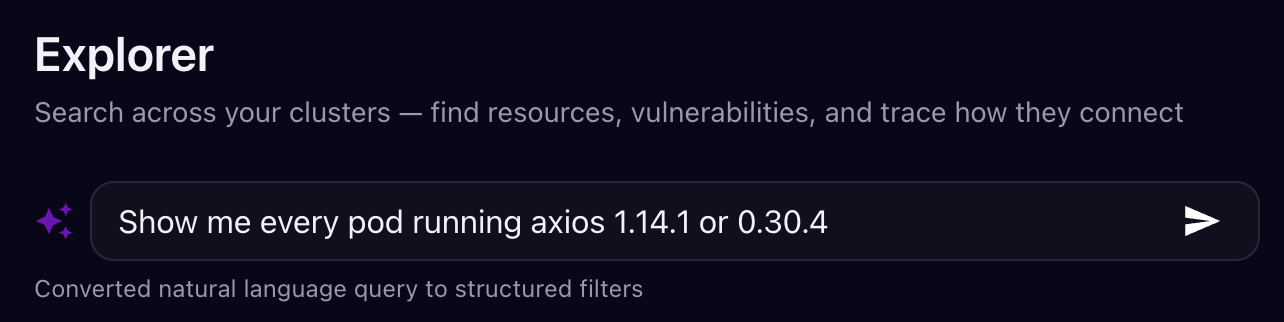
Juliet converts the natural language query into structured filters across your entire cluster graph and returns every match:
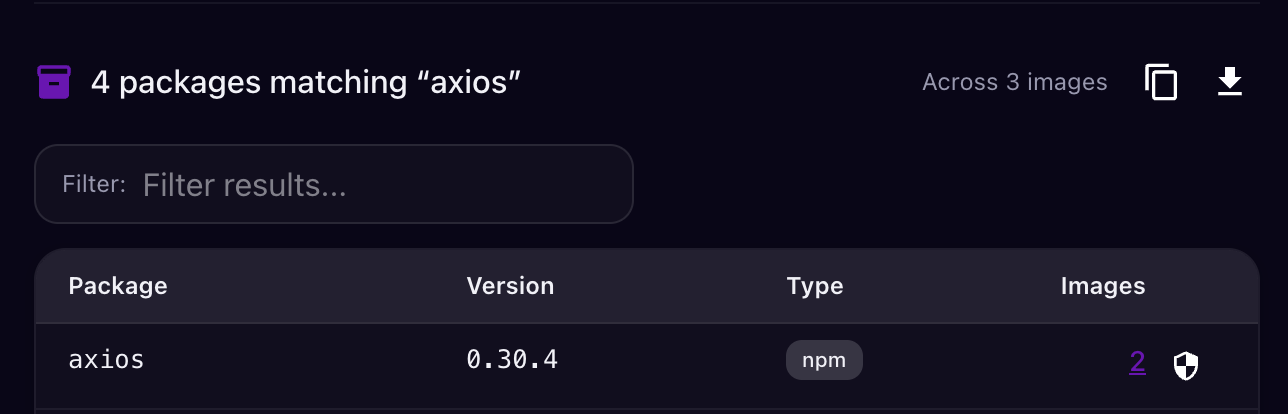
Every affected pod across every cluster, plus the blast radius: what service accounts those pods use, what secrets they can access, whether they have network egress to the C2 IP, and which other workloads they can reach. No grep, no per-image scanning, no guessing which namespaces to check.
You can also set an admission control policy to block any new deployment containing plain-crypto-js or the affected axios versions — so even if a team hasn't seen the advisory yet, the compromised image can't land in the cluster.
This is the difference between "we checked and we're clean" and "we checked everything, here's the proof, and nothing new can slip through."
What to do right now
If you find affected images:
Don't just update the lockfile and redeploy. The RAT may have already exfiltrated secrets from the container's environment. Rotate every secret that was mounted into or accessible from affected pods — service account tokens, API keys, database credentials, cloud provider credentials.
Rebuild images from scratch. Don't layer a fix on top of a potentially compromised image. Rebuild from the base image with a clean
npm ciagainst a verified lockfile.Check for lateral movement. If the RAT was active, the attacker had arbitrary code execution inside your cluster. Review RBAC permissions of affected pods — could they access other namespaces, secrets, or the Kubernetes API?
Block the C2 at the network level. Add
142.11.206.73andsfrclak[.]comto your network policy deny lists and DNS blocklists immediately.
If you don't find affected images:
Verify, don't assume. The absence of evidence in a spot check isn't the same as a clean bill of health. Scan every image in every namespace, not just the ones you think might be affected.
Add
plain-crypto-jsto your package blocklist in whatever registry proxy or admission policy you use.Enforce
npm ciin all Dockerfiles. If any of your Dockerfiles usenpm installinstead ofnpm ci, they ignore the lockfile and pull whatever's latest. That's how a three-hour window becomes your problem.
The pattern
This is the third major npm supply chain attack in 2026. The playbook is consistent: compromise a maintainer account, add a malicious transitive dependency (not modify source directly), use postinstall hooks for execution, and deploy platform-specific payloads that self-delete.
The defenses that matter are also consistent:
- Lockfile enforcement (
npm ci, notnpm install) in every build - SBOM generation on built images, not just source repos
- Runtime visibility into what's actually deployed in your clusters
- Admission control that can block known-bad packages before they run
- Network policy that limits egress from workloads by default
Your source repo being clean doesn't mean your cluster is clean. The question after every supply chain incident is: what's actually running right now, and can it reach anything it shouldn't? If you can't answer that in minutes, that's the gap to close.
Questions about this incident or need help checking your clusters? Reach us at contact@juliet.sh.